Discreet by design
A neutral name and a calm sunset icon. The only notification says “Steady is on”, so nothing awkward shows on your lock screen.
Android · Free at launch · 18+
SteadyPact quietly rests your phone at night, keeps a daily scroll limit, and pauses your chosen apps whenever you start a focus or study session. Set it once, then it stays out of your way.
Private by design. Nothing leaves your phone.No account, no login, no uploads. Your plan and scroll time stay on your device, and nobody is watching your screen — not us, and not anyone else.
Wind-down starts 30 minutes before.
THE STEADYPACT STANDARDFor people who want their evenings and attention back.
01 Neutral app identity02 Silent after setup03 Nothing uploadedYou make your plan once, while you are thinking clearly: when your phone rests at night and how many minutes a day you want on the apps that pull you in. When you need to get something done, you start a focus or study session with one tap.
SteadyPact saves that plan as Pacts on your phone and follows it quietly. Phone, messages, alarm, music, home screen and settings always stay usable.
Everything stays on your phone. There is no account to create and nothing to upload.
Nobody is perfect every day. The pause screen does not shame you or tell anyone. It gives you a moment, and the choice stays yours.
Focus in three taps
No menus to dig through. Tap Focus, pick how long, tap Start, and the apps you chose pause until the session ends.
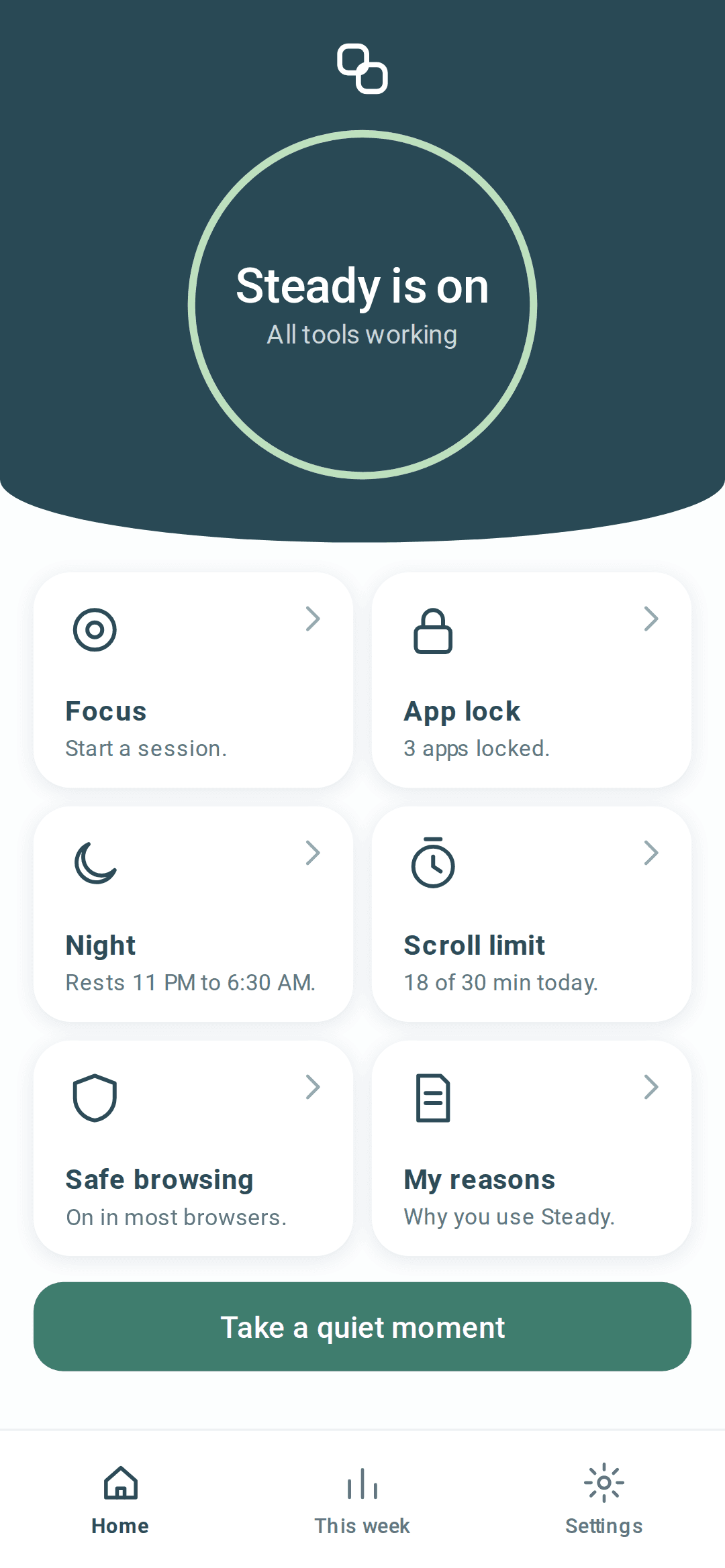
Tap 1
Every tool sits on one screen, so Focus is always one tap away.
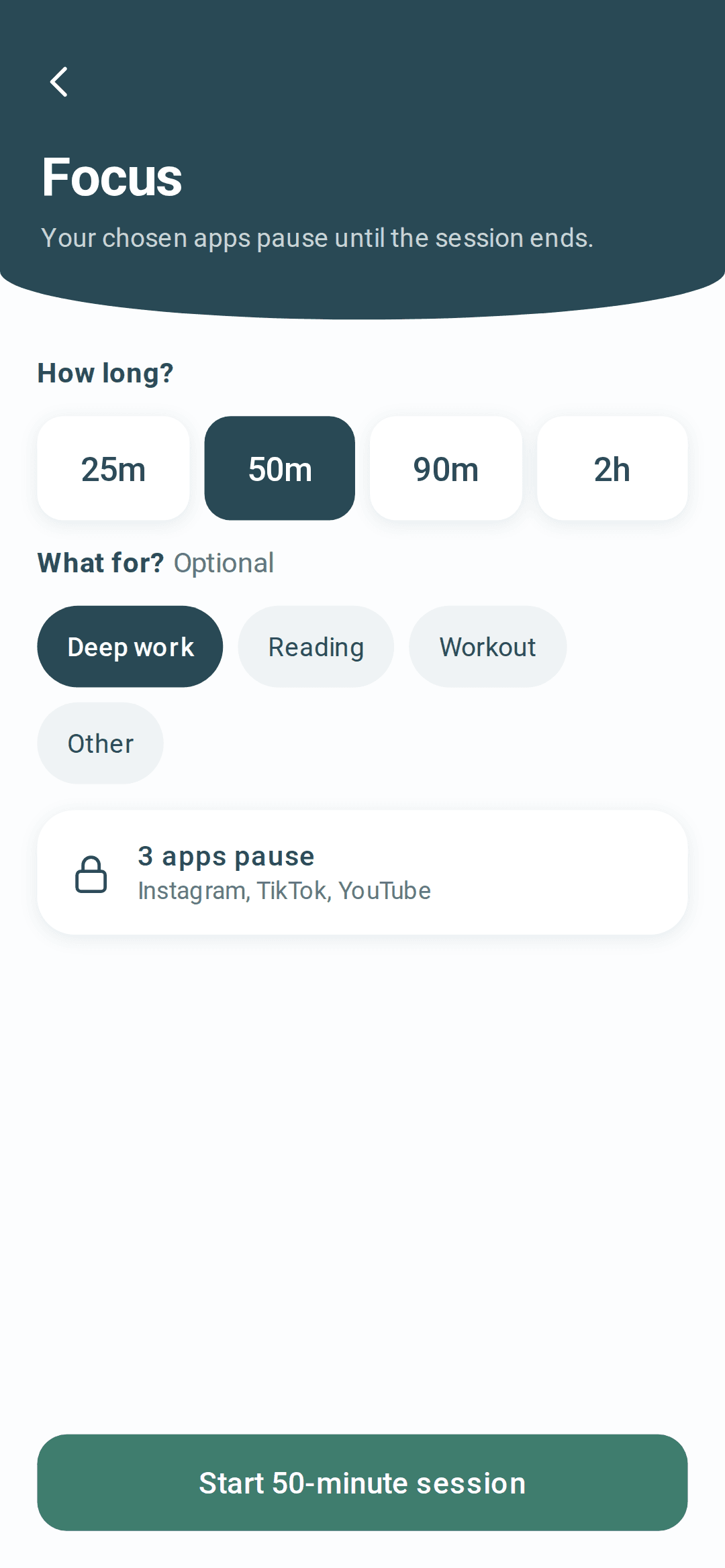
Taps 2 and 3
25 minutes to 2 hours. The apps you chose are already listed.
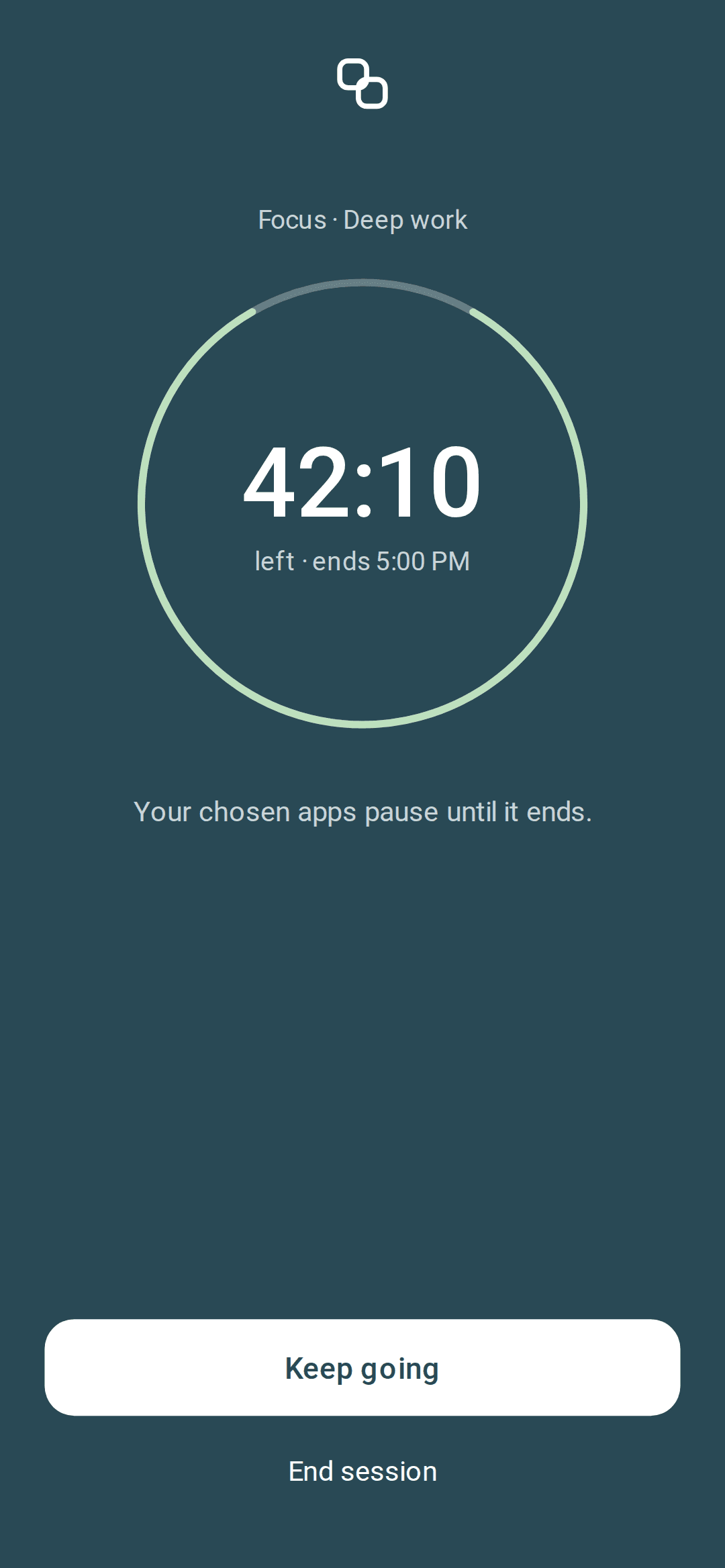
Done
The end time is on screen, and you can end early whenever you like.
A note from the founder
I'm building SteadyPact because asking for help with a private habit should not make your phone, your notifications, or your budget feel exposed. I want to build the kind of protection I would trust myself: quiet, honest about its limits, and designed to create a pause when a decision is hardest to keep. We're beginning with Android and testing the basics carefully before making bigger promises. If you join the launch list, your feedback will help shape what we build first.
— Sandeep Sharma, founder, SteadyPact
What changes
Most app blockers keep reminding you they exist. SteadyPact is built to be installed, set up in about a minute, and then forgotten.
A neutral name and a calm sunset icon. The only notification says “Steady is on”, so nothing awkward shows on your lock screen.
No streaks, no counters to lose and no reminder pings. Once it is set up, it works in the background and stays out of your way.
There is no sign-up or login. Your plan, chosen apps and scroll time stay on your phone and are never sent to us or anyone else.
The app has no advertising, analytics or tracking code, and this website sets no tracking cookies. There is nothing to sell, because we never receive your data.
What it does
Setup is Night, Scroll limit and two Android permissions. Sessions start from the home screen whenever you want one, and Safe browsing is an optional switch.
Pick when your phone rests and when your apps come back, every night or skipping Friday and Saturday. An optional wind-down gives you short five-minute slots in the half hour before.
Choose 15 to 90 minutes a day on the apps you pick. When the time is used up, they pause quietly until tomorrow.
Need to get something done? Start a Focus or Study session from home, pick 25 minutes to 2 hours, and your chosen apps pause until it ends. End early any time.
Opening a paused app shows a quiet screen. After a short wait you can still use it for a few minutes; it is your call. Calls, alarm, messages and music always work.
One optional switch uses Android's own Private DNS to filter adult and harmful websites in most browsers. The app checks it is really working with a test lookup.
The product standard
SteadyPact only describes what the app does today. No invented stats, no fake reviews, no promises it cannot keep.
Android first
SteadyPact launches on Google Play for Android. It rests your phone at night, pauses the apps you chose during sessions and after your scroll limit, with no account and nothing uploaded.
Night rest, a daily scroll limit, focus and study sessions and optional Safe browsing. No account, free at launch.
See how it worksPrice
No subscription and no trial countdown. The whole app is free when it launches on Google Play, in every country where it is available.
See everything it doesNo ads in the app, ever.
Good to know
Anything else? Write to launch@steadypact.com and a person will reply.
SteadyPact is in final testing and will launch on Google Play for Android. Join the launch list and we will email you once when it is available. It is for adults 18 and over.
Free at launch. No card required. There is no subscription and no trial. If we ever add paid options, the price will be shown clearly in Google Play before you pay anything.
No. SteadyPact is built to be set up once and forgotten. There are no streaks, no counters and no reminder pings. The only notification is the one Android requires while it runs, and it just says “Steady is on”.
Very little. The name and icon are neutral, the notification only says “Steady is on”, app screens are hidden from screenshots and recent apps, and SteadyPact never contacts anyone on your behalf. There is no account and nothing is uploaded.
Yes. The pause screen always lets you continue for a few minutes after a short wait, and you can end a session early. Calls, alarm, messages and music are never paused. You stay in charge.
No. There is no sign-up or login, and Night, Scroll limit and sessions all work offline. Your plan and screen time stay on your phone.
It runs a small check in the background, often while the screen is on and much less when it is off. Some phones close background apps to save battery, so we have short guides to keep it running on Xiaomi, vivo, OPPO, realme, Samsung and OnePlus.
No. SteadyPact uses two standard Android permissions, Usage Access and Display over other apps, and explains each one before you allow it. Safe browsing uses Android's own Private DNS setting, so your traffic never goes through us.
Launch list
Enter your email and country, confirm you are 18 or older, and we will let you know when SteadyPact is out. That is all we use it for.